Main Menu
This copy was last processed on . The copied wiki revision is dated .
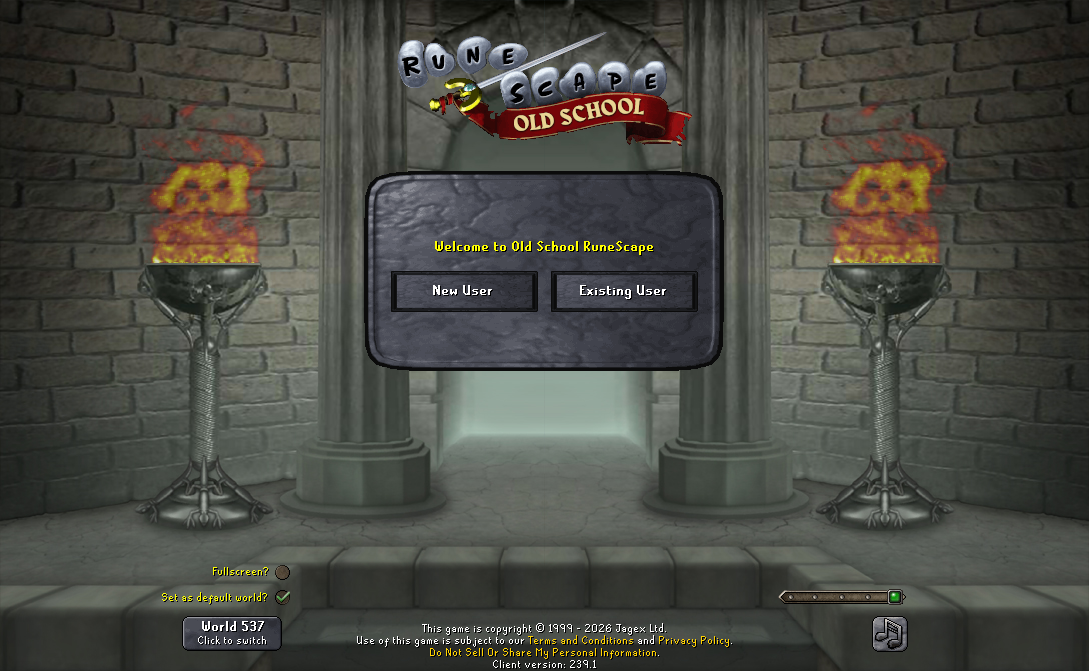
The Main Menu is the initial login screen on the game client. Once the client has been loaded (either by being launched locally or through the Old School RuneScape website if you still have the legacy Java Client installed), the main menu will appear. You can login to the game from the main menu or create a new account. You can also toggle the music straight from the main menu as well as switch between worlds.
Login Box
New User
This is the first option on the main menu. Clicking this option will direct you to the main create-an-account page on the main RuneScape website.
Existing User
This is the second option on the main menu. Clicking this option will prompt you to enter your RuneScape username and password, in order to play the game.
Forgotten Password
Accessed by typing in an incorrect or empty password for any username or email. Opens the appeal page that asks for recovery information.
Sign in with
This overrides "New User" and "Existing User" when playing on Mobile or the Official Client. "New User" is replaced with the ability to create and login to accounts made with Game Centre (IOS), Google (Android) or Steam (Steam). Steam client differs in text for these buttons (New user is "create account via steam", and existing user is "log-in with existing account") and once logged in continues to have "sign in with steam" which acts the same as "Play Now", due to how accounts link to Steam.
"Existing User" is replaced with a similar sign in with email/username button (Log-in with existing account on steam client) which redirects you to login through a webpage.
Play now
This shows with clients launched through the Jagex launcher and mobile clients that have had an account log in. It displays your the username of the account logged in, and sends you straight to the welcome screen. Mobile differs by allowing you to log out as it does not have the Jagex Launcher to easily switch between characters.
Features
World Select
At the bottom-left of the main menu shows the current selected world that the player will login to. Upon clicking it a menu showing all available free-to-play and members worlds along with the amount of players in each world for the player to select. The official client allows you to set the current world to be the default world set when launching the client. Quest Speedrunning, Leagues and Deadman mode worlds also change the title on the login screen to their respective title.
Music
At the bottom-right of the main menu is an icon which shows whether the background music is either on or muted. The official client in addition allows the volume of the music to be adjusted with a slider, this does not effect the music volume once logged in.
Normally, Scape Main is the background music played. However, during Halloween events, Scape Scared is played instead, and Scape Santa is played during Christmas events.
The music also changed during these updates:
- Farming - Scape Ground
- Construction - Scape Home
- Hunter - Scape Hunter
- Monkey Madness II - Scape Ape
- 2018 Birthday event - Scape Five
- Theatre of Blood - Welcome to the Theatre
- Song of the Elves - Scape Crystal
- Nex - The Ancient Prison
- Tombs of Amascut - Into the Tombs
- Desert Treasure II - The Fallen Empire - The Vault
- Varlamore: The Shining Kingdom - Children of the Sun
- While Guthix Sleeps - The Sound of Guthix (ambient)
- Varlamore: The Rising Darkness - A Forgotten Religion
- Varlamore: The Final Dawn - The Guidance of Ralos
- Sailing - Scape Sail
- Demonic Pacts League - Judgement of the Depths
- The Blood Moon Rises - Memories of the Myreque
Login screens
The appearance of the main menu, for the most part, remains the same throughout the year. However, it is usually changed to commemorate major content releases, as well as during Halloween and Christmas events. These typically change the background and torch sprites to something relevant to the update and occasionally titles other elements, most notably seen with the Inferno and Hunter login screens, but some are more subtle as with recent updates, which only tint the elements to be more fitting.
Flames of Lloigh-enn
These flames accompany the sides of the login screen, occasionally forming runes or various symbols when updated with the rest of the login screen for certain major updates and holiday events. Since Varlamore the Rising Darkness, the colour of the login flames can also be changed for an update.
The flames have experienced many updates in both RuneScape's and Old School's history, and are detailed in the animated gallery below.
-
Original flames that lasted through early 2007, being dithered and missing a pixel on the right.
-
Login flames in mid 2007, no longer dithered but continued missing a pixel. Present from the 2007 backup, this iteration lasted until 2019.
-
Current login flame, now wider for the wider login screen, consequence of this is now the 2 flames are identical, visible here on login screens after Kebos Lowlands. This is also present in the Java Client despite not being able to display it any wider than before.
-
The flames shifting to green and purple.
-
Varlamore: The Rising Darkness, this was the first time the colour of flames were updated for an update.
-
Blue flames for Leagues V: Raging Echoes
-
More orange flames for Yama
-
Teal flames for Varlamore: The Final Dawn
-
Flames for Sailing, the same used for Yama.


Changes
| Date | Changes |
|---|---|
| 1 November 2013 (Update) |
The login screen's world-picker interface now uses red buttons for PvP worlds to help make them more distinctive. |
| 17 September 2013 (Update) |
The login screen's Mute button now remembers your choice. |
| 22 March 2013 (Update | poll) |
Pressing 'Enter' will now log you in after typing you username/password on the login screen. |
| 11 April 2005 (Update) |
The login screen music was changed from Scape Original to Scape Main. |
Trivia
- The login screen accepts the inputs of special and punctuation characters, such as
. : ; " ' , ?, into the password field. However, when a user creates an account or changes their account password, these characters are not allowed in the password as only letter and number characters are allowed in the account password. - A person cannot login to their account if they are already logged in the same account in RuneScape. A message stating that the previous/current account session has not ended, if the player tries to login with that account in Old School RuneScape.
- In Zamorak Considers Some Issues, Zamorak calls the torches the Flames of Lloigh-enn (a Celtic-sounding pun on "log in"): "The flames of Lloigh-enn are an often rumoured, almost mythical, barrier between various dimensions, that require a spell recited most precisely, that is different for each individual who wishes to pass through."
- The original login screen theme song was Scape Original.
- The Sound of Guthix (ambient) is the only login music which is not listed on the music player.
| Control Panel |
| ||||
|---|---|---|---|---|---|
| Minimap | |||||
| Other | |||||


