Welcome Screen
This copy was last processed on . The copied wiki revision is dated .
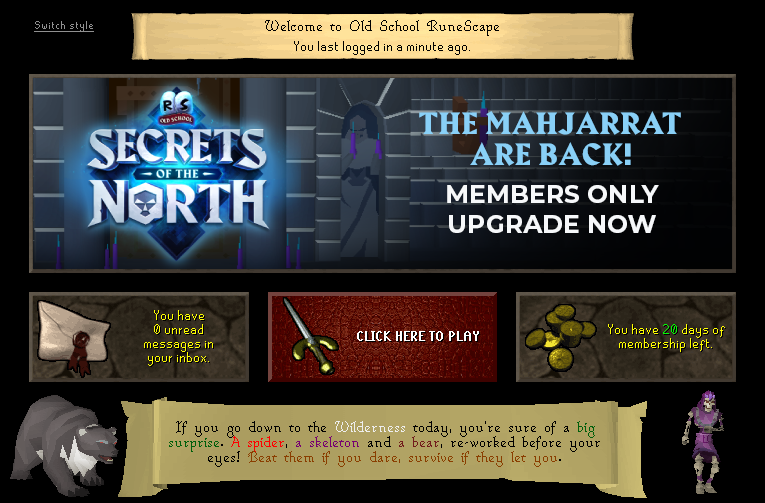
The Welcome Screen is the interface that is shown after logging in. It displays a welcome message, the time since you last logged in, several informational tiles about your account and about recent updates, and a button to start playing the game. (Note: you can’t access your inbox on mobile)
The welcome screen will not appear if the player logs in to a dangerous area, such as the wilderness, or if the player is creating a new account.
Features
Top banner
The banner at the top of the welcome screen welcomes you to Old School RuneScape, and displays the time that has passed since you logged in. The time passed has a precision of up to one minute. The largest unit it will display is a number of days. This time since last login is shared between Old School RuneScape and RuneScape. Long-time returning players will often find their welcome screen to show a time since login of thousands of days.
Centre banner
The large banner at the centre of the welcome screen displays a specially-designed graphic, chosen by Jagex and updated regularly. Commonly, this graphic will be relevant to the current events of the game, showcasing new content releases, holiday events, or important announcements. This banner is overridden for when the player has not logged in for a while.
Clicking the centre banner will start playing the game.
Inbox tile
The inbox tile displays the number of unread messages in your account's inbox, and visually depicts a sealed letter.
Clicking the inbox tile will open your account's inbox, to view unread and previously read messages.
Play button
The play button is the primary interact-able tile on the welcome screen. Visually, the play button depicts the sword seen in the Old School RuneScape logo.
Clicking the play button closes the welcome screen and allows the player to start playing the game.
Membership tile
The membership tile displays the number of days left in a player's membership, if the player is currently a member. Visually, the button depicts a pile of coins.
Clicking the membership tile will open your account's membership page, to purchase or renew your membership.
Message of the Week
The message of the week is a banner is fielded by two chosen models, sometimes animated, relevant to the message of the week. Chosen by Jagex and updated weekly or for certain events like Summits, the message of the week will summarise the major changes in the most recent update, often with a humorous twist.

Clicking the banner will open the relevant newspost for the message of the week.
If a player has been away for a long time, the bottom banner will instead welcome the player back and when clicked will open the news archive for the current month. This special banner will be fielded by multi-coloured question marks.
History
The Welcome screen launched with RuneScape 2, being much simpler to its current version. It received an update on 27 September 2005 to its second, more recognisable form. An update on 4 January 2006 removed a stone concerning the state of the slayers contact details. By 24 April 2006 it was updated again to remove the password set date stone, and changing the texture to what is present in the launch version of Old School RuneScape.
Before the update of 24th of October 2013 you could see the IP address that you logged in with. After certain complaints by Old School RuneScape streamers Jagex updated the Welcome Screen to not show your IP address.
Since an update on 5 September 2019, a new banner space showcasing the game's content replaced the tiles about Bank PIN and the tip on not giving an account's password to anyone. It was only available for "a selection of new players".[1] The new welcome screen became the default for all players on 26 January 2020.[2] A "Switch style" button was added to toggle it on and off.
On 2 February 2023, Jagex announced that they would be discontinuing the older version of the welcome screen.[3] The classic welcome screen was discontinued on 8 February 2023, removing the option to switch style.[4]
-
Initial version of the welcome screen.
-
Welcome screen warning the player to set password recovery questions.
-
Welcome screen after 14 September - 2 November 2004.
-
Welcome screen warning after 14 September - 2 November 2004.
-
The welcome screen after 27 September 2005.
-
Older appearance of the Welcome Screen.
Gallery
-
Password icon
-
Inbox icon
-
Password change icon
-
Contact details icon
-
Bank PIN icon
-
Membership icon
-
Prop sword icon


Changes
| Date | Changes |
|---|---|
| 8 February 2023 (Update) |
The older version of the welcome screen has been discontinued. |
| 29 January 2020 (Update) |
The new welcome screen was made available to all players, co-existing alongside the previous version. |
| 5 September 2019 (Update) |
A new variant of the welcome screen was introduced and made available to a selection of new players. |
| 24 October 2013 (Update) |
The welcome screen no longer displays the IP address from which you last logged into the game. |
References
| Control Panel |
| ||||
|---|---|---|---|---|---|
| Minimap | |||||
| Other | |||||


.png)
.png)
.png)
.png)
.png)
.png)
