Debug Console
Article
Live index
This copy was last processed on . The copied wiki revision is dated .
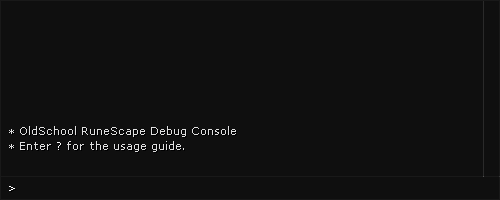
The Debug Console is a tool exclusive to the Official Client and, formerly, the iOS closed beta client. It has a set of commands that may prove useful for debugging technical issues on the client or setting several preferences. A list of commands can be viewed by typing ? in the console.
To open the console on desktop, hold down Alt and then press ` (grave accent). The console could be opened on the iOS beta client by swiping down 4 fingers.
Commands
| Command | Result |
|---|---|
| ? | Lists the commands. |
| buildinfo [copy/print] | Toggles client build info display. buildinfo copy results in the info being copied to the clipboard, with buildinfo print instead printing it into the debug console. |
| chattimestamp | Toggles the chat timestamps function within the Settings. |
| cls | Clears the console screen. |
| consolebounds [<x> <y> <width> <height>] | Sets the boundaries for the debug console to the parameters specified. Defaults to a size of 500x200 pixels. |
| displayfps | Shows the client's current frames per second and memory usage (KB). |
| mouseovertext | Toggles the "Show mouseover text" functionality within the Settings. |
| prefs <name> <value> | Sets player specific preferences. prefs -List shows a list of preferences available. |
| redrawminimap | Forces the minimap to be rerendered. |
| reloadhighlights | Usage unknown. |
| renderself | Toggles the player's character model visibility to themselves. |
| setwindowsize <width> <height> | Sets the size of the client's window. |
| setwindowtopmost | Toggles whether the client will always be on top of other windows/applications. |
| toggleantidrag | Toggles whether items in the inventory can only be moved when holding down the Shift key. |
| toggleroof | Toggles whether roofs are selectively or always hidden. |
| uiquality | Changes the quality of the UI. Can choose between 0 (Nearest-Neighbour), 1 (Linear), and 2 (Bicubic). |
Preferences
Preferences can be changed by typing prefs <name> <value> into the console.
| Preference | Result |
|---|---|
| AmbientVolume | Changes the area sound volume. Can choose from 0 to 127. |
| Brightness | Changes the brightness. Can choose from 0 to 100. |
| ChatTimeStampMode | Toggles whether timestamps are shown in the chatbox. Can choose between 0 (off) and 1 (server). |
| DisplayBuildInfo | Toggles client build info display shown above. |
| DisplayFps | Shows the client's current frames per second and memory usage (KB). Can choose between 0 (off) and 1 (on). |
| DrawDistance | Changes the draw distance. Can choose from 25 to 90. |
| FpsLimit | Changes the frames per second limit. |
| Fullscreen | Sets the game window to take up the entirity of screen monitor in a borderless, non-resizeable window. Can choose between 0 (off) and 1 (on). |
| HideUserName | Usage unknown. |
| MidiVolume | Changes the music volume. Can choose from 0 to 255. |
| MuteTitleScreen | Mutes the login screen music. Can choose between 0 (off) and 1 (on). |
| RemoveRoof | Toggles whether roofs are selectively or always hidden. Can choose between 0 (off) and 1 (on). |
| ScreenshotPath | Changes the screenshot path. |
| UIQuality | Changes the quality of the UI. Can choose between 0 (Nearest-Neighbour), 1 (Linear), and 2 (Bicubic). |
| WaveVolume | Changes the sound effect volume. Can choose from 0 to 127. |
| WindowHeight | Changes the height of the client. |
| WindowMode | Changes the client layout. Can choose between 1 (fixed) and 2 (resizable). |
| WindowTopmost | Changes whether the client is always on top. Can choose between 0 (off) and 1 (on). |
| WindowWidth | Changes the width of the client. |
Trivia
- As with RuneScape's Developer console counterpart, the console has snowflakes in its interface for the duration of the season of winter. The snow continues to pile up on the background until the interface is completely filled. Closing the interface or resizing the console window will reset or clear the snow inside the interface.
| Control Panel |
| ||||
|---|---|---|---|---|---|
| Minimap | |||||
| Other | |||||


