Lag
This copy was last processed on . The copied wiki revision is dated .
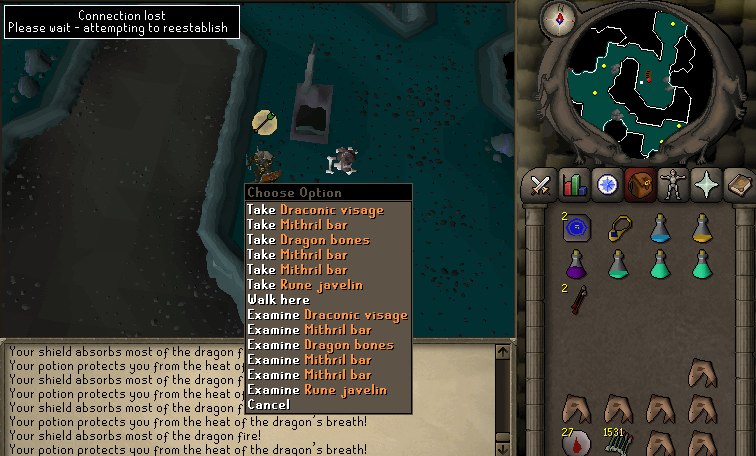
Lag is the delay (also called 'latency') between a player input action and the moment this input is processed and displayed to the player. This delay is always present due to the restraints of data processing and transfer speed, but the term 'lag' is typically used to describe a noticable delay that impedes a smooth gaming experience. The amount of lag depends on several factors, such as server load, the player's internet connection, and the performance of their gaming device. Testing how long it takes for an action to be sent to the game server and back is called pinging. The response time of a 'ping' is often denoted in miliseconds. While moderate lag does often not directly cause a player to fully disconnect from the server, severe lag and sudden disconnections can sometimes be caused by the same underlying issues. Lag is typically not caused by problems within the power of Jagex, except in the event of server lag occurring.
When a player is participating in dangerous activities, lag can be a common cause of death, especially when it occurs suddenly. Lag can be especially dangerous to hardcore ironmen. Players experiencing unstable connections or high levels of lag should avoid partaking in activities such as player killing, boss hunting or fighting other powerful monsters.
Types of lag
Connection lag
Connection lag is the most common type of lag. It is caused by issues with the speed or stability of the internet connection between the game client and the game server. This might lie at any point along the user's internet connection, their internet service provider, or bandwidth limitations in the connection to the Old School RuneScape server in question. Information is sent from RuneScape to the player's device as so-called 'packages'. If the player is experiencing a consistently slow response time, it is often because they are physically far away from the game server they are connected to. The delay in response time between the continents of Europe and North-America can already be 90 miliseconds for example. If a connection is unstable, packages can also become "lost" or corrupted during transit. If packages fail to arrive or contain incorrect information, the server has to request these packages again to correct the error, causing even further delays.
If a problem occurs in the client-server communication, the "Connection lost. Please wait - attempting to reestablish..." message appears in the top-left corner of the game screen. Then, the client attempts to reconnect to the server. If this succeeds, the game session is continued, but if connection cannot be reestablished, the player will be disconnected from the server. This may happen if the connection suddenly ends, such as by unplugging the Ethernet cable, or if the connection is not stable enough for effective communication.
If no network error is detected on the client side, the client continues to attempt communication with the server until it times out. The game may seemingly continue to function, making it possible to still manipulate already-existing data such as rotating the camera, scrolling through the chat box, or right-clicking items or objects. However, these actions will not be sent to the server if the connection is not reestablished within a certain time limit (five to twenty seconds). The game will then automatically log out the player.
In rare cases, the game client might still receive data from the server, but be unable to sent any input data back. In such cases server-side actions may continue, including movement of NPCs and other players, receiving damage, etc. In this case, the player experiencing lag will be unable to move, talk, eat, or provide any other input to the server. If the player is in combat at this time, they will sometimes not be able to retaliate, even if Auto Retaliate is on. If the connection stability does not improve, the player will automatically log out after when their idle timer expires.
If the player has died because of lag and has lost items outside of Item Retrieval Services, they have 15 minutes from the moment they died in order to retrieve their items from their grave before they are moved to the Death's Office. The grave countdown timer will continue regardless of lag.
Hardware lag
Hardware lag is caused by outdated, faulty or overloaded hardware, often caused by insufficient available RAM (Random Access Memory) or by having insufficient CPU (Central Processing Unit) or GPU (Graphics Processing Unit) power. Typically this results in low frame rates, stuttering or input lag, caused by the game client not being able to load the game contents quickly enough to display them accurately in real time.
Troubleshooting hardware lag can be done by monitoring hardware resource usage through programs such as task manager on Windows devices or the activity monitor on devices running macOS, or through the device care settings if they are playing on an Android device. If a high percentage of the RAM or CPU power is being used, a common cause might be that the player is running too many other applications in the background. If the GPU is at high capacity, the player might want to lower the game resolution or disable graphically enhancing plug-ins from third party clients such as HDOS or RuneLite.
Server lag
Server lag occurs when the game server cannot handle the simultaneous requests of all its clients and processes. Problems on the end of Jagex are rare and not solvable by troubleshooting on the player's end. They can occur due to server issues and connectivity issues at the data centers where the servers are located. While it is sometimes simply caused by concentrated player activity, it cannot be easily reproduced by individual players, and attempting to do so is reportable under bug abuse.
Common solutions to lag
- Download and use the official Old School RuneScape Game Client.
- Try switching to a world with a lower ping value and/or fewer people.
- Pause or stop any downloads you have in progress, or restrict internet usage by other applications.
- Restart your computer. Often, if a computer is left on for an extended period of time (e.g. more than a week), it could be significantly slower.
- Close any memory- or CPU-intensive programs you have running.
- Update your graphical drivers. Newer graphical drivers can sometimes increase performance due to bugs/glitches being fixed.
| Engine | |||||||
|---|---|---|---|---|---|---|---|
| Game clients |
| ||||||
| Performance | |||||||
| Exploits | |||||||
| Graphics | |||||||
| Servers | |||||||

