RuneScript
This copy was last processed on . The copied wiki revision is dated .
RuneScript is a scripting language that Jagex uses to create content for Old School RuneScape. The game engine is not written in RuneScript, but instead Java. RuneScript was developed by Jagex Ltd. to allow their other staff that do not know Java to add and edit content for the game. The game engine cannot read the RuneScript source files directly, they first need to be translated into a more computer-friendly form known as bytecode.
| “ | Hmm, syntax wise it's similar to any C-style language, except variable names are prefixed with their type (eg. %varname is an integer). We also lack full array support. Other than that, it'd do pretty much anything you could do in C or Java. | ” |
— Mod Chris E Game Engine Q&A[1]
|
The minor updates are usually for introducing a new map and adding new NPCs, and for these updates, a RuneScript file is added into the program. The major updates are for the source code, which is usually for making large changes such as introducing new areas in RuneScape, new skills, or for bug fixes.
Syntax
The syntax of RuneScript is very simple and meant to be understandable by people who are not very familiar with programming.
Declarations
A script or a configuration can be declared using the brackets (example: [declaration_name])
Triggers
Triggers indicate when a script will be called by the game engine. To add a trigger to a script, it has to be appended at the start of the declaration name followed by a comma (example: [trigger,declaration_name]).
Below is a list of the most common triggers:
| Name | Description |
|---|---|
| clientscript | Can only be triggered by the client game engine or using "runclientscript" command. |
| proc | Can only be triggered manually using the "~" operator. |
| label | Can only be triggered manually using the "@" operator. |
| if_button[1..10] | Can be triggered when clicking on an interface button. |
| opheld[1..5] | Can be triggered when using an item option in inventory such as "Wear" or "Equip". |
| opheldu | Can be triggered when an item is used on another item. |
| opnpc[1..5] | Can be triggered when operating an NPC option such as "Talk-to". |
| apnpc[1..5] | Can be triggered when approaching an NPC after clicking one of its options. |
| opnpcu | Can be triggered when an item is used on an NPC. |
| oploc[1..5] | Can be triggered when using an object option such as "Cut". |
| aploc[1..5] | Can be triggered when approaching an object after clicking one of its options.
(Example usage would be the bank booth, it opens before the player is next to it) |
| ai_queue3 | Can be triggered when an NPC dies. Usually used for drop scripts. |
Variables
There are three kinds of variables in RuneScript:
- A constant which can be identified using the caret sign (example: ^total_bank_slots), this can be accessed anywhere.
- A local variable which can be identified using the dollar sign (example: $pagecount), this can be accessed only from the current script.
- A player or NPC variable which can be identified using the modulo sign (example: %varname), this can be accessed anywhere from across scripts.
Definitions
RuneScript allows defining various elements using the def_* syntax:
| Declaration | Description | Example |
|---|---|---|
| def_int | Defines an integer variable. | def_int $skill_exp = 9 |
| def_obj | Defines an object variable, often used to reference in-game items.
This can make the object variable reusable in scripts. |
[def_obj, abyssal_whip]
4151 |
| def_string | Defines a string variable. | def_string $hello = "Hello" |
Commands
Commands are subroutines that are defined in the game engine, which don't need any special operator to call them, for example map_members is a command.
Below is a list of the common commands that are used by the drop table scripts:
| Special Commands | |
|---|---|
| Syntax | Meaning |
| add(x,y) | Add both values (x and y) together (x + y) |
| sub(x,y) | Subtract both values (x and y) from each other (x - y) |
| gosub(x) | Execute the (x) subroutine then returning to the calling subroutine |
| jump(x) | Execute the (x) subroutine without returning to the calling subroutine |
| npc_coord | Return the current NPC coordinate |
| map_members | Return (1) if the current world is a member world |
| find_uid(id) | Return true if finds uid |
| npc_findhero | Return true if the killing player (hero) is found |
| obj_add(coord,item_name,quantity,ticks_before_despawning) | Spawn an item on the ground |
| npc_param(param) | Return a parameter value from the NPC definition (e.g: death_drop return the 100% drop for an npc) |
Subroutines
Subroutines are scripts that are defined in RuneScript, they can be called by either one of the four:
- a jump operator (@) (example: @bronze_arrowheads)
- a gosub operator ( ~) (example: ~arceuus_door_forbid)
- a jump keyword (example: jump(bronze_arrowheads))
- a gosub keyword (example: gosub(arceuus_door_forbid))
Below is a list of the common subroutines that are used by the drop table scripts:
| General Subroutines | |
|---|---|
| Name | Meaning |
| npc_death | Handles the default NPC death procedure |
| ultrarare | Possibly the rare drop table subroutine |
| kill4jewel | Possibly the gem drop table subroutine |
| randomjewel | Return an item name |
| randomherb | Return an item name |
| loot_choosehero | Return UID of killing player |
| dagannoth_droptalisman | Returns an item name |
| trail_hardcluedrop(denominator,coord) | Checks and rolls a chance to drop a Clue scroll (hard) if appropriate |
| lootdrop_forbroadcast(item,coord,bool(?),broadcast_map_chunk,int,int) | Generate a drop broadcast at the same time as dropping loot (for boss monsters) |
| lootdrop(coord,item,quantity,ticks_before_despawning) | Generate an item dropped as loot |
| lootdrop_deathdrop(coord,item) | Generates a 100% drop from a monster |
| trail_gethardclue | If player can get a Clue scroll (hard), ?sets %namedobj to Clue scroll (hard), or else sets %namedobj to null |
| trail_checkmediumdrop | Checks if a medium clue requires the player to kill an NPC and obtain a medium clue key from that NPC.[2] |
Arrays
Currently, RuneScript has a known limitation where arrays do not persist properly through nested subroutine calls. Specifically:
- If [proc,a] calls [proc,b], which in turn calls [proc,c], and [proc,c] defines an array, then any caller of [proc,a] (e.g. ~a) will lose all their arrays at that point and any new arrays need to have their IDs start from 0 again.[3]
- This means arrays are not properly scoped within the execution stack, potentially causing unexpected behaviour when working with deeply nested procedures.
-
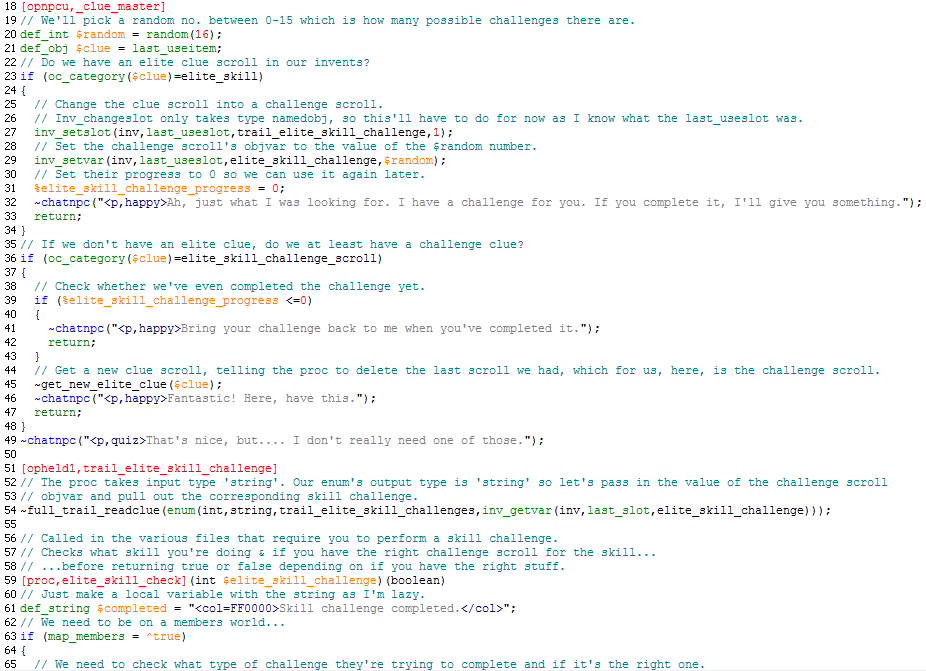
Example of RuneScript code
References
| Engine | |||||||
|---|---|---|---|---|---|---|---|
| Game clients |
| ||||||
| Performance | |||||||
| Exploits | |||||||
| Graphics | |||||||
| Servers | |||||||


